How to Cite LinkedIn in APA
- Written by Tomas Elliott (Ph.D.)
- Reviewed by Lucas Street
- Published on 03/15/2024
- Updated on 02/10/2026
More than ever these days, social media websites or apps like LinkedIn are extremely useful resources for students, as they connect us with other professionals and allow us to exchange useful info. But did you know a LinkedIn post or profile can actually be used as a source for your essay or other academic work?
If you want an up-to-the-minute reference on a particular topic, LinkedIn is a great place to look. Since public figures, companies, and professionals often use LinkedIn to share news and information with a wide audience, a well-chosen LinkedIn post or profile can serve as a great popular (as opposed to scholarly), primary source to refer to in your writing.
When we use information from LinkedIn in academic work, though, it’s important to always cite it properly, following the rules of APA. This guide will show you how to do so in simple steps, whether it’s a post or a profile that you’re citing.
HOW TO CITE A LINKEDIN POST IN APA
When citing a LinkedIn post in APA format, it’s crucial to include specific details to accurately reference the content. To do so, simply follow these steps.
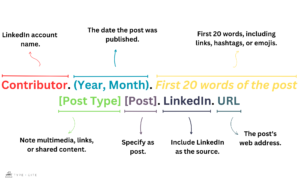
- Identify the Author: Begin the citation by stating the name associated with the LinkedIn account.
- Date of the Post: Include the exact date when the post was published, in the usual APA “year, month day” format. LinkedIn doesn’t give the exact date a post was made; instead, it tells you how long ago it was posted. Use this info to figure out the specific publication date. (For example, you might see “2d” directly under the poster’s headline; this means it was posted two days ago.)
- Title: Use the first 20 words, including any links, hashtags, or emojis. Make sure to italicize them and to also preserve any capitalization, punctuation, or formatting present in the original words.
- Post Asset: When a post includes images, videos, links to other websites, or shares content from another post, note that in square brackets after the title.
- Post Label: Specify the type of post in square brackets.
- Include the Source Element: Finally, credit LinkedIn as the site name in the source element and provide the URL of the post.
LINKEDIN POST CITATION EXAMPLES
| Citation |
Obama, B. (2025, December). As 2025 comes to a close, I’m continuing a tradition that I started during my time in the White House [Images attached] [Post]. LinkedIn. https://www.linkedin.com/posts/barackobama_as-2025-comes-to-a-close-im-continuing-activity-7407519235108929537-VP56
|
| Structure |
Author Surname, Author Initial(s). (Year, Month). First 20 words of the post [Post Type] [Post]. LinkedIn. URL
|
HOW TO CITE A LINKEDIN PROFILE IN APA
When citing a LinkedIn profile in APA format, the process differs slightly.
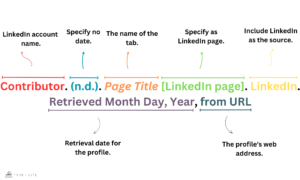
- Identify the Author: Begin the citation by stating the name associated with the LinkedIn account.
- Date of Publication: Unlike LinkedIn posts, LinkedIn profiles do not typically provide a specific date of publication. In such cases, use n.d. (no date) to indicate the absence of date information.
- Page Title: Use the title of the LinkedIn page, such as Home or About.
- Notation: Add [LinkedIn page] after the title.
- Include the Source Element: Credit LinkedIn as the site name in the source element.
- Provide the Retrieval Date: Since LinkedIn content can change over time, include the date you accessed the page. The format is required to follow Retrieved Month Day, Year.
- Include the URL: Finally, provide the URL of the LinkedIn page.
LINKEDIN PROFILE CITATION EXAMPLES
| Citation |
Obama, B. (n.d.). Home [LinkedIn page]. LinkedIn. Retrieved January 17, 2026, from https://www.linkedin.com/in/barackobama
|
| Structure |
Author Surname, Author Initial(s). (n.d.). Page Title [LinkedIn page]. LinkedIn. Retrieved Month Day, Year, from URL
|
 |
Getting the Date Right: Make sure to figure out the date a post was published accurately. Since LinkedIn only tells you how long ago the post was made, pay attention to these time clues. By doing this, you can work out when the post was actually published. For example, if LinkedIn says a post was made two weeks ago, you can figure out the rough date by counting back from today. Adding Important Details: When you cite a LinkedIn post, include all the important details so people can easily find what you’re talking about. This means mentioning who wrote it, the title of the post, and when it was published. Remember to also include any extra stuff like pictures or links by putting them in square brackets. This makes your citation complete and helpful for others. Consistency in Format: Consistency is key when it comes to formatting citations. Whether you’re using parenthetical citations within the text or narrative citations integrated into your sentences, ensure that your citations follow the same format throughout your paper. This consistency enhances readability and makes it easier for readers to understand and navigate your references. Adhere to APA guidelines for citation formatting to maintain uniformity and professionalism in your academic writing. |
GIVE YOUR CITATIONS A BOOST TODAY
Start your TypeCite Boost 3 day free trial today. Then just $4.99 per month to save your citations, organize in projects, and much more.
SIGN UP
Tomas Elliott (Ph.D.)
Tomas Elliott is an assistant Professor of English at Northeastern University London. His research specialisms include the history of theatre and film, European modernism, world literature, film adaptation, transmedia studies and citation practices. He read English and French Literature at Trinity College, Oxford, before completing a Ph.D. in Comparative Literature and Literary Theory at the University of Pennsylvania.