How to Cite TikTok in MLA
- Written by Hannah Berry (Ph.D.)
- Reviewed by Amy McInerney
- Published on 04/16/2024
- Updated on 01/03/2026
TikTok has become a significant platform for sharing short videos, creating a need for proper citation in academic works. Understanding how to cite TikTok content in MLA format is crucial for researchers and students alike. This article provides a detailed guide on citing TikTok videos and profiles in MLA style.
CITING A TIKTOK VIDEO
To cite a TikTok video in MLA format, you’ll first need to gather the elements of a citation. These include:
- Creator’s Name: Start with the creator’s username or real name, if provided, followed by their TikTok handle in square brackets. Note that including the @ is part of the username.
- Title: Enclose the text of the TikTok video in quotation marks, without adding a period after the quotation marks. If there is no specific title, create a short description of the video and include that as the title.
- Platform and Date: Specify that the source is from TikTok, always writing this in italics, followed by the day, month, and year the video was posted.
- URL: Include the full URL of the TikTok video.
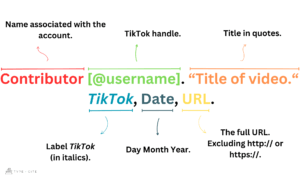
EXAMPLE CITATION FOR CITING A TIKTOK VIDEO
Putting it all together, a complete MLA citation for a TikTok video looks like this:
| Citation |
Ava [@avafashionista]. “The hottest trends from Paris Fashion Week 🔥 #PFW2024.” TikTok, 3 Feb. 2024, www.tiktok.com/@avafashionista/video/83146.
|
| Structure |
TikTok Account Name [@username]. “Text of TikTok.” TikTok, Day Month Year, URL. |
In-Text Citations for TikTok Videos
In addition to including TikTok videos as entries in your MLA Works Cited page, it’s also important to include in-text citations for these resources. To do so, you’ll simply need to include the creator’s username at the end of the sentence that refers to the content. The @ symbol at the start of the username is not necessary, nor are page numbers or URLs.
For example:
In her TikTok reel that focused on the incoming nor’easter Tyler Stackhouse noted that there was a lot of snow on the way (TStackhouse).
CITING A TIKTOK PROFILE
When citing a TikTok profile, follow these guidelines:
- Creator’s Name: Begin with the creator’s name or username, if available, followed by their TikTok handle in square brackets.
- Title: Describe the content of the profile, in quotation marks.
- Platform: Mention that the source is from TikTok in italics.
- Date: For profiles where dates are not specified, omit the date from the citation.
- URL: Provide the URL of the TikTok profile.
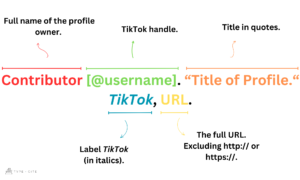
EXAMPLE CITATION FOR CITING A TIKTOK PROFILE
Here’s how to cite a TikTok profile in MLA format:
| Citation |
Jackson [@jackson_nflfan]. “Game day predictions and highlights! 🏈 #NFL2024.” TikTok, www.tiktok.com/@jackson_nfl.
|
| Structure |
TikTok Account Name [@username]. “Title of profile.” TikTok, URL.
|
 |
Condense Lengthy Text with Ellipsis: When citing lengthy titles or descriptions in your MLA citation for TikTok content, you can streamline the text by including only the first few words followed by an ellipsis (…). This allows you to maintain clarity and conciseness while still conveying the essential information of the source. Use Descriptive Text for Profile Titles: When citing a TikTok profile, use descriptive text to indicate the content of the profile. Instead of simply stating “Profile” or “Account,” provide a brief description of the content found on the profile. For example, if the profile mainly features cooking videos, you could use “Cooking Videos” as the profile title in your citation. Check URL Accuracy: Before finalizing your citation, double-check the accuracy of the URL you provide. Ensure that the URL leads directly to the specific TikTok video or profile you are citing. This helps readers to access the original source easily and prevents any confusion or broken links. If possible, use the permalink or direct link to the TikTok content to ensure precision in your citation. |
GIVE YOUR CITATIONS A BOOST TODAY
Start your TypeCite Boost 3 day free trial today. Then just $4.99 per month to save your citations, organize in projects, and much more.
SIGN UP
Hannah Berry (Ph.D.)
Hannah Berry has lectured at several colleges and teaches at the WEA. Besides publishing extensively, she has taught citation skills and written multiple style guides.